Granola Alternative That Actually Records Your Meetings
 vs
vs
Granola is a popular AI notepad. It listens to your meeting audio and writes you clean notes. That works well if notes are all you need.
But a lot of meetings have something on screen worth keeping: a slide deck, a shared screen, a bug someone is walking you through, a live demo. Granola cannot give you any of that back, because it never records the meeting. It keeps text and deletes the audio.
If you want an alternative that keeps the actual recording of the meeting, VideoToBe is built for exactly that.
Granola gives you- Text notes and an AI summary
- No video of the meeting
- No slides or screen shares kept
- Nothing to rewatch or share
VideoToBe gives you- The full meeting video
- Every slide and screen share, on video
- Speaker-labeled transcript and AI summary
- A shareable link anyone can watch
The core difference: notes vs an actual recording
Granola captures your computer's audio, transcribes it, and then deletes the audio file. What you are left with is a set of notes. There is no video, and there is no record of anything that was on screen.
VideoToBe records the real meeting. A recorder bot joins the call and captures the video and audio, so everything that happened is preserved:
- The slides someone presented
- A screen share of an error, a dashboard, or a document
- A product demo or a code walkthrough
- The full conversation, in the speaker's own words, not a paraphrase
The bottom line
Notes summarize a meeting. A recording preserves it. When a teammate asks what exactly the customer clicked before it broke, a note cannot answer that. The recording can, because the screen share is right there in the video.
Granola vs VideoToBe at a glance
| Feature | Granola | VideoToBe |
|---|---|---|
| Records the meeting video | No, notes only | Yes |
| Captures screen shares and slides | No | Yes |
| How it captures | Silent, invisible to others | Visible bot everyone sees |
| Works if you skip or your device sleeps | No, your app must be running | Yes, the bot joins from the cloud |
| Install required | Desktop app | Nothing, forward an invite or paste a link |
| Shareable recording link | No, notes stay in one app | Yes, no account needed to watch |
| Transcribe your own uploaded files | No | Yes |
| Platforms | Meet, Zoom, Teams (audio) | Meet, Zoom, Teams (full recording) |
| AI summary and transcript | Yes | Yes |
Where VideoToBe wins
For customer support and QA teams
A customer joins a call and shares their screen to show a bug. With a notes-only tool you get a line like customer reported an error at checkout, which does not help the engineer fix anything.
With VideoToBe, the entire screen share is in the recording. Your team rewinds to the exact error message, the exact click, the exact state of the app. The recording becomes the bug report, and you can drop the share link straight into the ticket.
For sales teams running demos
Sales calls are full of shared screens: your demo, the prospect's current setup, a pricing slide. Notes flatten all of that into text.
VideoToBe keeps the actual demo footage. You can go back and see which feature the prospect reacted to, where an objection came up, and which slide caused confusion. When a solutions engineer or manager joins the deal later, you send them the recording instead of retelling the call.
For trainers, teachers, and onboarding
If you teach or run training over Google Meet, most of the value is on screen: slides, walkthroughs, a shared document. Someone who missed the session does not want notes, they want to see the walkthrough.
With VideoToBe you share one link and the whole group rewatches the real session, no account required. A notes app cannot produce a class recording at all, let alone share it.
For any team that needs to share the recording
Granola notes live inside the note-taker's app. VideoToBe recordings come with a private link anyone can open. One person records the meeting, and the whole team, or the whole community, gets access without buying seats for everyone.
Where Granola is the better fit
To be fair, Granola is genuinely good at what it is built for. If you sit in back-to-back calls and you only need quick personal notes, Granola is fast and low-friction. There is no bot to admit and no join delay, and some people specifically want capture that no one else can see.
VideoToBe is the better choice when the recording itself has to exist, when there is something on screen worth seeing again, and when other people need to watch it too.
How VideoToBe recording works
There is nothing to install. You have two ways to start:
- Forward the invite. Add
[email protected]to your Google Calendar event. The VideoToBe Recorder joins at meeting time. - Paste the link. In the app, open the Meetings page, paste the meeting URL, and click Send bot.
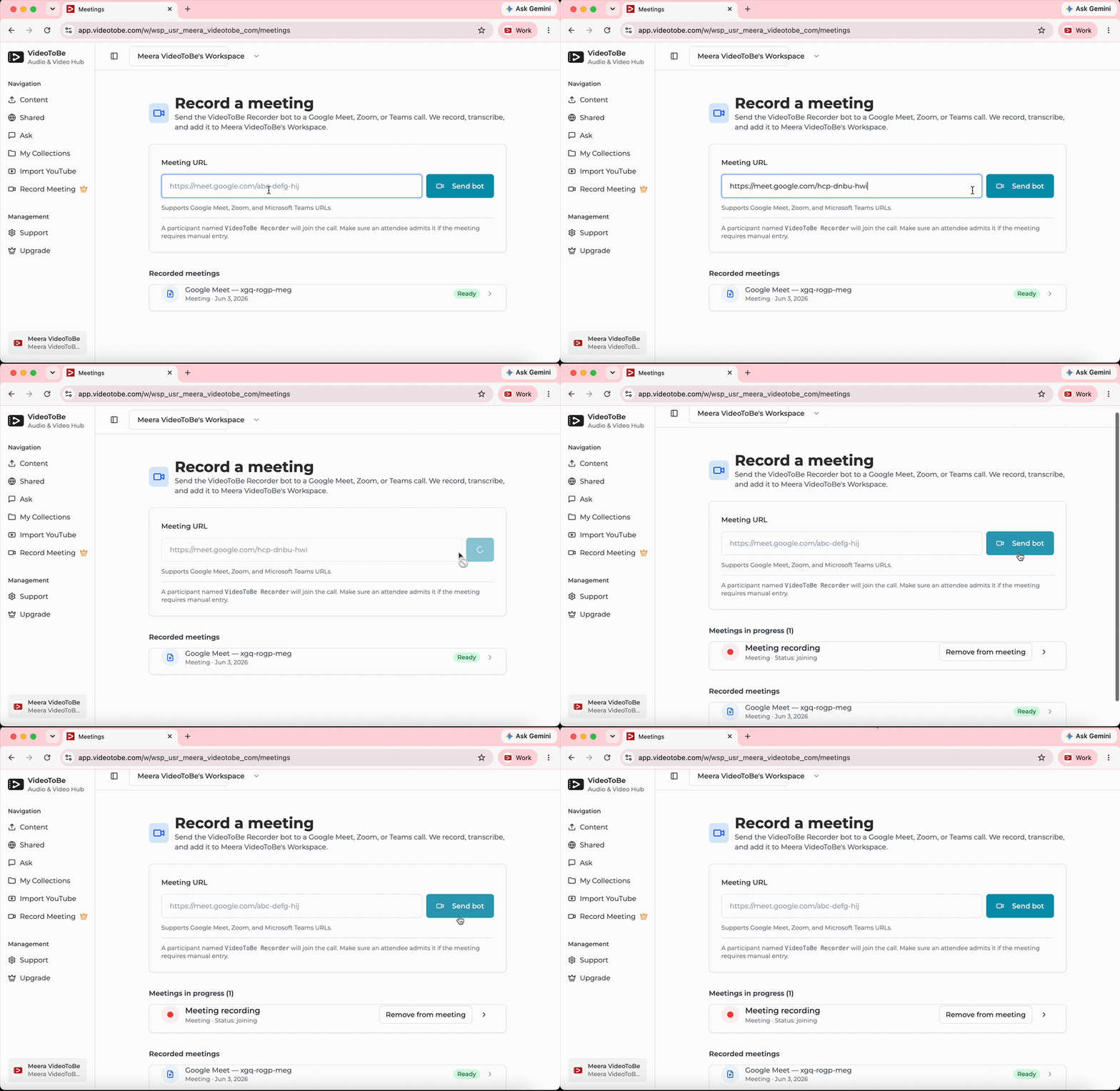
When the call ends you get the video, a transcript with speaker labels, and an AI summary with key takeaways and action items, all on one page with a link you can share. It works the same way for Google Meet, Zoom, and Microsoft Teams.
Get the full recording of your next meeting, screen shares and all, plus transcript and summary.
Try VideoToBe Free →Want the step-by-step version? See how to record a Google Meet or the VideoToBe Recorder bot guide.
The verdict
Granola writes notes. VideoToBe keeps the meeting. If a paraphrased summary is enough, a notepad is fine. But the moment a call has slides, a screen share, a demo, or a bug on screen, notes are not enough, and that is where an actual recording wins.
